bcache24.bmc and Cache0000.bin: RDP Cache File Format
Byte-level layout of the RDP bitmap cache: bcache*.bmc slots and 20-byte headers, interleaved RLE, pixel depths, slot remnants, and the RDP8bmp Cache*.bin format.
TL;DR. Legacy bcache*.bmc files have no file header: they are a sequence of fixed-size slots, each a 20-byte header (key1, key2, width, height, data length, flags) followed by a 64×64 pixel area at 1, 2 or 4 bytes per pixel. Rows are bottom-up; flag 0x08 marks a tile compressed with RDP interleaved RLE. Cache0000.bin and its siblings start with RDP8bmp\0 and a version, then hold uncompressed 32-bit tiles back to back, each behind a 12-byte header, rows top-down. Neither file layout is documented by Microsoft: what follows is reverse-engineered, mainly by ANSSI's bmc-tools, and is what RDP Bitmap Cache Parser implements.
If you are new to the artifact, read the RDP bitmap cache forensics guide first.
Two formats, one folder
| Legacy BMC | RDP 8 persistent cache | |
|---|---|---|
| Files | bcache2.bmc, bcache22.bmc, bcache24.bmc (bmc-tools also mentions bcache23.bmc) | Cache0000.bin, Cache0001.bin, ... |
| Written by | Older clients; can still be found on current systems | Newer versions of the client |
| File header | None | RDP8bmp\0 + u32 version |
| Tile record | 20-byte header + fixed 64×64 slot area | 12-byte header + exactly width×height×4 bytes |
| Pixel depth | 8, 16 or 32 bpp depending on the file | 32 bpp (B, G, R, X) |
| Row order | Bottom-up | Top-down |
| Compression | Some tiles, interleaved RLE | None |
| Remnants possible | Yes | No (records are packed) |
Glossary entries: bcache*.bmc, Cache*.bin.
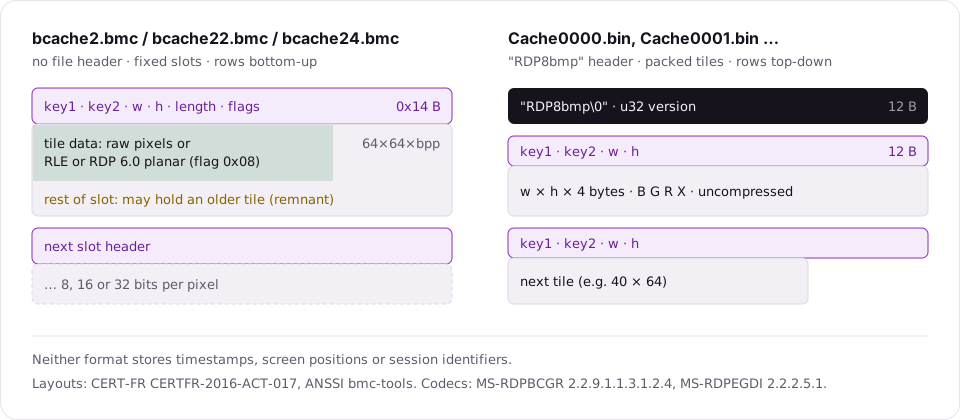
The legacy bcache*.bmc format
File name and pixel depth
The number in the name tells you the slot depth:
| File | Bits per pixel | Bytes per pixel | Slot size (20 + 64×64×Bpp) |
|---|---|---|---|
bcache2.bmc | 8 | 1 | 4,116 bytes |
bcache22.bmc | 16 | 2 | 8,212 bytes |
bcache24.bmc | 32 | 4 | 16,404 bytes |
The slot sizes are simple arithmetic from the structure below, not additional documented values. bcache23.bmc is mentioned by bmc-tools; we do not describe it further here.
Slot layout
There is no file header. The file is a run of slots, and every slot starts with a 20-byte (0x14) header, little-endian:
| Offset | Size | Field | Meaning |
|---|---|---|---|
0x00 | 4 | key1 | First half of the cache key |
0x04 | 4 | key2 | Second half of the cache key |
0x08 | 2 | width | Tile width in pixels |
0x0A | 2 | height | Tile height in pixels |
0x0C | 4 | length | Length of the tile data that follows |
0x10 | 4 | flags | Bit 0x08: compressed |
After the header comes the slot area, 64×64×bytes-per-pixel, whatever the actual tile size. A 64×64 tile fills it; a 16×64 tile at the edge of the screen uses only part of it.
Field names are descriptive, not official. What matters is that key1 and key2 together form the 64-bit key of the bitmap.
Uncompressed tiles
When flag 0x08 is clear, the data is raw pixels. The bytes per pixel are length ÷ (width × height). Rows are stored bottom-up, like a BMP, so a decoder has to flip them.
A detail worth knowing when you compare tools: bmc-tools assumes a row stride of 64 pixels in the slot. RDP Bitmap Cache Parser uses the tile's own width as the row stride for tiles narrower than 64 pixels. On such tiles the two tools can produce different images; if a narrow tile looks sheared in one, try the other.
Compressed tiles: interleaved RLE
When flag 0x08 is set (bmc-tools treats this bit as the compression flag; the meaning is inferred, not documented for this file), the data is compressed with the RDP interleaved RLE bitmap codec. That codec is documented, in MS-RDPBCGR section 2.2.9.1.1.3.1.2.4. Compressed 32-bit tiles can also use the RDP 6.0 planar codec, documented in MS-RDPEGDI; bmc-tools skips those tiles, while RDP Bitmap Cache Parser decodes them.
The stream is a sequence of orders. Each order has a regular form, a "lite" form and, for long runs, a "mega-mega" form. The families:
| Order family | What it encodes |
|---|---|
| Background run | Copy pixels from the scanline above (black on the first scanline) |
| Foreground run | Scanline-above pixel XOR a foreground colour (the colour itself on the first scanline) |
| FG/BG image | A bitmask choosing between the two cases above |
| Colour run | One colour repeated |
| Colour image | Literal pixels |
| Dithered run | Two alternating colours |
| White / black | A single white or black pixel |
Because background runs refer to the previous scanline, one corrupted byte can smear the rest of the tile. A tile the decoder cannot fully decompress is marked "Not decoded" in the tool rather than guessed at.
8-bit tiles and the palette
The palette of an 8-bit session is not stored in the cache. Decoders, bmc-tools and ours included, use a default Windows palette, so colours are approximate. Text and window shapes usually stay readable; do not draw conclusions from the exact colours of an 8-bit tile.
Slot remnants
Slots have a fixed size and are reused. When a smaller tile is written into a slot that previously held a larger one, the unused part of the slot can still hold pixels of the old tile. That leftover is a slot remnant.
Remnants matter: they can be the only surviving trace of something that was on screen earlier. In the fictional sample shipped with the tool, one slot in bcache22.bmc still holds the top of an older tile, the title bar of a creds.txt editor window, a file that was created and later deleted on the remote host.
bmc-tools exports remnants with -o / --old. RDP Bitmap Cache Parser shows them alongside regular tiles, flagged "Slot remnant". A remnant is a fragment of an older image, not a complete tile: say so when you report one.
The RDP 8 Cache*.bin format
Newer versions of the client write Cache0000.bin, Cache0001.bin and so on. The layout is simpler.
File header
| Offset | Size | Field |
|---|---|---|
0x00 | 8 | Magic RDP8bmp\0 |
0x08 | 4 | Version (u32) |
Tile records
Tiles follow back to back until the end of the file:
| Offset in record | Size | Field |
|---|---|---|
0x00 | 4 | key1 |
0x04 | 4 | key2 |
0x08 | 2 | width |
0x0A | 2 | height |
0x0C | width×height×4 | Pixels, B, G, R, X, rows top-down |
No compression, no length field (the size follows from width and height), no slot padding. Records are packed, so there are no remnants in the sense above.
What neither format stores
| Missing | Consequence |
|---|---|
| Timestamps | Date sessions with other artifacts (source host artifacts) |
| Screen coordinates | Screens must be rebuilt by eye (reconstruction) |
| Session or target identifiers | Attribute to a target with logs and registry, not with the cache |
| Duplicates | Identical pieces are cached once |
What the parser shows per tile
For each tile, the detail panel of RDP Bitmap Cache Parser lists the cache key, width and height, bit depth, compression, and file offset, so you can check any tile against a hex editor or against bmc-tools output. See RDP cache parsers compared for how the tools differ.
FAQ
Is the RDP bitmap cache file format documented by Microsoft?
No. The file layouts of bcache*.bmc and Cache*.bin are known from reverse engineering, chiefly ANSSI's bmc-tools. Only the bitmap codecs used inside compressed .bmc tiles are documented: interleaved RLE in MS-RDPBCGR and, for 32-bit tiles, the RDP 6.0 planar codec in MS-RDPEGDI.
What is the difference between bcache22.bmc and bcache24.bmc?
The pixel depth of the slots: bcache22.bmc holds 16 bits per pixel, bcache24.bmc 32 bits per pixel. bcache2.bmc holds 8 bits per pixel.
Why do some tiles have wrong colours?
Most often they are 8-bit tiles. The session palette is not stored in the cache, so decoders fall back to a default Windows palette and colours are approximate. Shapes and text usually remain readable.